


Construction Mode in Travellers Rest is a gameplay feature that allows players to expand, design, and organize their tavern layout.
Once unlocked, it gives you creative control over building rooms, placing furniture, changing flooring and walls, and setting up functional zones.
You can access Construction Mode using the Construction Table, which becomes available after reaching Reputation Level 7.
If you chose to follow the in-game tutorial, the Construction Table is provided automatically. Otherwise, you’ll need to purchase it from the town carpenter for gold and silver coins.
In Construction Mode, you can:
- Build and expand rooms to fit more guests or activities
- Customize floors and walls for aesthetic upgrades
- Assign functional zones like dining or crafting areas
- Organize your tavern layout for better workflow and efficiency
To make structural changes, you’ll need to place specific building materials like wooden planks, nails, stone blocks, or mortar into the Construction Table’s inventory.
This mode is essential for creating a well-functioning, visually pleasing tavern that enhances guest satisfaction and productivity.
Requirements to Unlock Construction Mode
To unlock Construction Mode in Travellers Rest, you first need to reach Reputation Level 7. Reputation increases as you serve guests, keep your tavern clean, and maintain good service. Once you hit level 7, you gain access to the Construction Table, which is essential for entering Construction Mode.
If you followed the in-game tutorial, the Construction Table will be automatically given to you by Woody, the town carpenter. However, if you skipped the tutorial, you’ll need to purchase the table from Woody for 3 gold and 50 silver coins.
While not required to unlock the mode itself, having building materials on hand is important if you plan to make structural changes. These materials include Wooden Planks, Iron Nails, Stone Blocks, and Mortar, which need to be placed inside the Construction Table’s inventory before you can start building or modifying your tavern.
Once you have the Construction Table and meet the reputation requirement, you’re ready to begin customizing your tavern in Construction Mode.
Step-by-Step Guide
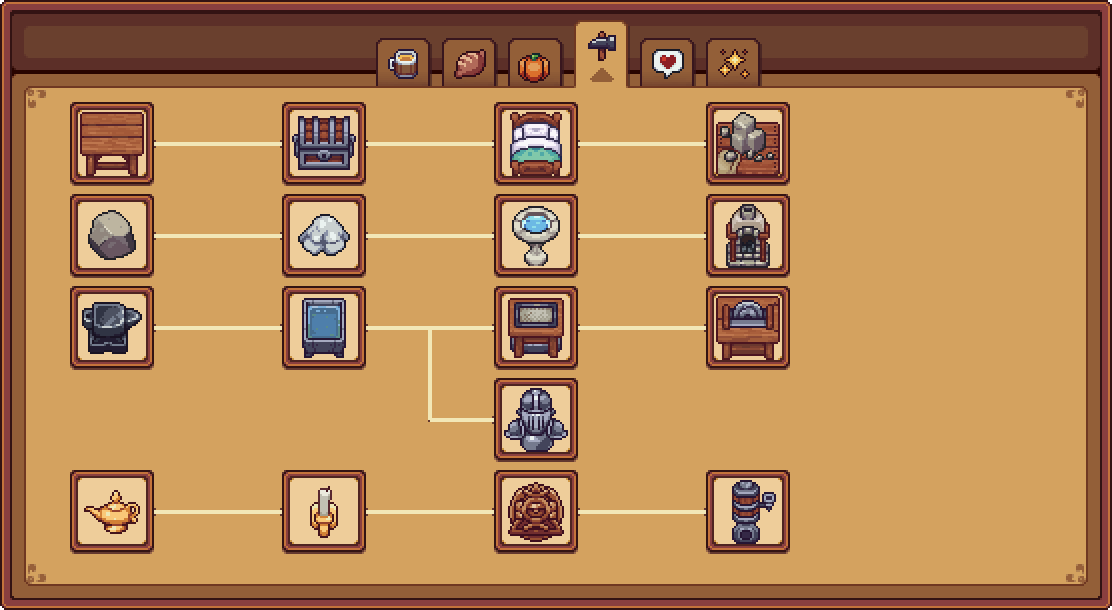
Reach Reputation Level 7
You must first level up your tavern reputation to level 7. This happens naturally as you serve customers, clean tables, and manage your tavern efficiently.
Get the Construction Table
- If you followed the tutorial: You already have the Construction Table from Woody, the town carpenter.
- If you skipped the tutorial: Visit Woody and buy the Construction Table for 3 gold and 50 silver coins.
Place the Construction Table in Your Tavern
Open your inventory, select the Construction Table, and place it somewhere inside your tavern for easy access.
Gather Building Materials (Optional for Changes)
To build or modify rooms, make sure to collect materials like:
- Wooden Planks
- Iron Nails
- Stone Blocks
- Mortar
Put these items into the inventory slots of the Construction Table.
Interact With the Construction Table
Walk up to the Construction Table and press the interaction key (usually E) to open Construction Mode.
Use the Tools in Construction Mode
Once inside, you’ll have access to various building tools. You can:
- Build or expand rooms
- Change flooring and walls
- Assign zones (e.g., dining, crafting, bedroom)
- Rotate or remove elements
Save and Exit the Mode
When you’re done editing, exit Construction Mode and your changes will be saved automatically.
What You Can Do in Construction Mode
Construction Mode in Travellers Rest gives you full control over the layout and design of your tavern. Once inside this mode, you can customize, expand, and optimize your space to suit both your gameplay goals and aesthetic preferences.
Here’s what you can do:
Build and Expand Rooms
You can create new rooms or expand existing ones to increase your tavern’s capacity or add special-purpose areas like bedrooms, kitchens, or crafting rooms.
Change Walls and Floors
Design your tavern’s interior by changing wall styles and flooring. This lets you personalize each room’s appearance to match your desired theme.
Assign Functional Zones
You can mark areas with specific purposes:
- Dining zones for tables and chairs where customers eat
- Crafting zones for placing stations like brewing kettles or ovens
- Bedrooms for offering lodging
These zones help define how each room is used by the game’s systems.
Place and Move Furniture
Easily place, rotate, or move furniture, decorations, and equipment. This allows for better traffic flow and helps maximize efficiency and appeal.
Remove or Rebuild Structures
You can delete walls, floors, or even entire rooms if you want to redesign your tavern’s layout. This gives you flexibility to correct or improve past decisions.
Plan Efficient Layouts
Use Construction Mode strategically to place stations and furniture near each other for smoother workflows — reducing walking time and boosting productivity.
Why Can’t I Enter Construction Mode? (Fixes)
If you can’t enter Construction Mode in Travellers Rest, there are a few common reasons why this might happen. First, you need to make sure you’ve reached Reputation Level 7, as this is required to unlock Construction Mode. If your reputation is lower, keep serving customers and maintaining your tavern to level up.
Next, check whether you have the Construction Table. If you skipped the tutorial, you won’t get one automatically. You’ll need to purchase the table from Woody, the carpenter, for 3 gold and 50 silver coins, then place it inside your tavern.
Also, ensure you are standing right next to the Construction Table and pressing the correct interaction key (usually E). If the table is placed somewhere inaccessible or you’re too far away, the mode won’t open.
While you don’t need materials just to enter Construction Mode, you won’t be able to build or expand rooms without placing necessary building materials like wooden planks, mortar, and nails into the Construction Table’s inventory.
Lastly, sometimes bugs or glitches can prevent the mode from activating. If you suspect this, try restarting the game, updating to the latest version, or verifying the game files. If problems persist, reaching out to the game’s support might help.
Tips for Building Better in Travellers Rest
- Plan Your Layout Ahead
Before placing walls or rooms, think about how you want your tavern to flow. Group related areas like the kitchen, dining, and crafting rooms close together for efficient workflows. - Use Functional Zones Wisely
Assign zones clearly—dining areas for customers, crafting zones for production stations, and bedrooms for guests. Proper zoning helps your tavern run smoothly and boosts customer satisfaction. - Don’t Overbuild Too Soon
Focus on steady expansion rather than huge, costly projects. Build rooms you actually need and can supply with materials to avoid wasting resources. - Upgrade Floors and Walls for Better Appeal
Changing flooring and wall styles not only looks good but can also increase your tavern’s reputation. Keep your guests impressed with stylish interiors. - Keep Furniture Accessible
Arrange furniture and equipment with enough space around them. This helps your staff and customers move freely and speeds up service. - Stock Up on Materials in Advance
Gather plenty of wood, nails, stone, and mortar before starting big projects. Running out mid-build slows progress and wastes trips. - Experiment with Design
Don’t be afraid to tear down and rebuild parts of your tavern. Construction Mode lets you test layouts until you find what works best. - Use Shortcuts and Hotkeys
Learn the controls for rotating, placing, and removing items quickly. This saves time during large-scale construction.
Conclusion
Construction Mode in Travellers Rest is an essential feature that adds depth and creativity to your tavern management experience.
Unlocking this mode by reaching Reputation Level 7 and obtaining the Construction Table opens up countless possibilities for customizing and expanding your tavern.
You can design every aspect of your inn—from the layout of rooms to the placement of furniture and crafting stations—tailoring it to your play style and aesthetic preferences.
A well-planned tavern layout improves workflow efficiency, making it easier for staff to serve customers and manage resources.
Assigning functional zones such as dining areas, crafting rooms, and bedrooms helps optimize how your tavern operates, while upgrading floors and walls enhances its overall appeal, boosting your reputation.
Gathering sufficient materials ahead of time and experimenting with different designs ensures smooth construction and a satisfying building experience.
Whether you prefer a cozy, intimate inn or a bustling tavern with many rooms and features, mastering Construction Mode empowers you to create a space that reflects your vision.
