

Samsung codes list delivers an extensive collection of secret USSD and MMI shortcuts that unlock powerful diagnostic tools, hardware tests, firmware details, and advanced configurations directly from the dialer on Galaxy smartphones and tablets.
In late 2025, with One UI 7 rolling out globally on devices like the Galaxy S25 Ultra, Z Fold7, and A-series lineup, the majority of the classic Samsung codes list remains fully operational, offering users unparalleled insight into device health, network performance, and system status without requiring root access or third-party applications.
These codes, often called service or engineering codes, have been part of Samsung’s ecosystem for over a decade and continue to evolve alongside Android 15-based software. The Samsung codes list includes everything from quick IMEI checks to comprehensive sensor calibration suites, making it an essential resource for power users, technicians, and anyone troubleshooting performance issues efficiently.
Safe Usage Guidelines for Samsung Codes List
Proper technique ensures the Samsung codes list works reliably while protecting your device.
Always use the stock Samsung Phone app dialer—third-party dialers may not process codes correctly.
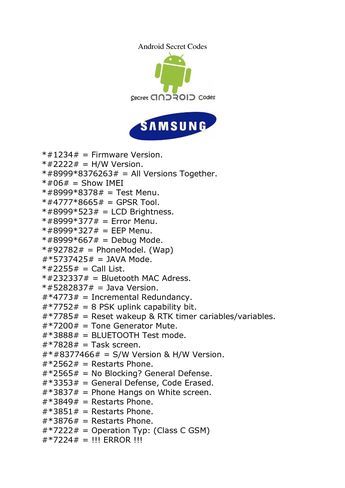
Steps for execution:
- Open Phone app
- Type the exact code including * and # symbols
- Press call or wait for automatic launch
- Navigate menus carefully and exit properly
Important precautions in 2025:
- Disable Auto Blocker temporarily if codes fail (Settings > Security and privacy > Auto Blocker)
- Never share codes that reveal IMEI or serial numbers publicly
- Avoid experimental codes on primary devices
- Restart phone if a menu freezes
Following these practices prevents accidental resets or temporary glitches.
Core Device Information Codes in Samsung Codes List
Fundamental entries from the Samsung codes list provide instant access to critical identifiers and build details.
Most essential codes:
- *#06# – Instantly displays IMEI (dual-SIM shows both), serial number, and model info
- *#1234# – Reveals PDA (AP), CSC (region/carrier), and modem versions clearly
- *#44336# – Shows software change list number, build time, and update history
- #12580369# – Displays hardware and software revision details
These codes require no network connection and execute in seconds.
They prove invaluable when verifying device authenticity, checking for genuine firmware, or preparing for warranty claims.
Comprehensive Hardware Diagnostic Menu: #0#
The crown jewel of the Samsung codes list is #0#, opening a dedicated engineering test suite for thorough hardware validation.
This interactive menu covers nearly every component:
- Display tests (Red, Green, Blue, Black, Gradient)
- Touchscreen grid and multi-touch verification
- Vibration motor intensity levels
- Accelerometer, gyroscope, and magnetic sensor calibration
- Proximity, light, and barometer functionality
- Front/back camera preview and flash operation
- Speaker, receiver, and microphone loopback
- Grip sensor and heart rate monitor (where applicable)
In 2025 Galaxy models with advanced under-display tech, the menu includes specialized OLED burn-in checks and pixel health diagnostics.
Technicians and buyers widely use this for pre-purchase inspections.
Battery Health and Power Management Codes
Dedicated power-related entries in the Samsung codes list offer deeper insights than standard settings.
Key battery codes:
- *#0228# – Detailed stats including voltage, temperature, capacity percentage, charge cycles, and health status
- *#9900# – SysDump menu with options to delete dumpstate logs, freeing storage and potentially improving performance
- *#0283# – Loopback control for audio routing tests
- *#0782# – Real-time clock and battery temperature monitoring
These help diagnose fast drainage, calibration issues, or thermal throttling accurately.
Regular monitoring extends lithium-ion lifespan significantly.
Network Signal and Connectivity Codes
Advanced cellular and wireless codes form a crucial segment of the Samsung codes list.
Primary network entries:
- *#0011# – Service mode displaying current band, signal strength (RSRP/RSRQ), cell ID, and connection type
- ##4636## – Android testing menu with phone info, cell statistics, Wi-Fi status, and preferred network type selection
- *#2263# – Band selection for manual frequency locking
- *#2683662# – Advanced service mode for deeper radio configuration
With 5G Standalone deployments expanding in 2025, these codes reveal mmWave and sub-6 connections clearly.
They assist in optimizing coverage in fringe areas.
Camera System Diagnostic Codes
Imaging-focused codes in the Samsung codes list isolate camera hardware effectively.
Specialized entries:
- *#34971539# – Camera firmware version, sensor details, and power consumption stats
- Individual module tests accessible via #0# menu
- Mega Cam sensor verification for high-resolution models
Verify autofocus, OIS stabilization, and multi-lens switching seamlessly.
Essential for flagship devices emphasizing photography.
Software Build and Update Verification Codes
Precise firmware tracking codes ensure the Samsung codes list helps confirm legitimate updates.
Build-specific codes:
- *#1111# – FTA (Factory) software version
- *#2222# – FTA hardware version
- *#7284# – Modem and UART/USB configuration
- *#872564# – USB logging control
These reveal if the device runs official or modified software.
USB and Developer Connectivity Codes
Development-oriented entries from the Samsung codes list manage connection protocols.
Relevant codes:
- *#0808# – USB settings for MTP, PTP, MIDI, RNDIS, or charging-only modes
- *#9090# – Diagnostic configuration for serial and USB logging
- *#7280# – UART mode selection
Critical for ADB setup and file transfers.
Regulatory and Safety Information Codes
Compliance data appears instantly via dedicated Samsung codes list entries.
Standard code:
- *#07# – Regulatory information including SAR values for head and body exposure
Displays maximum radiation levels measured during certification.
Useful for health-conscious users.
Performance Optimization and Log Codes
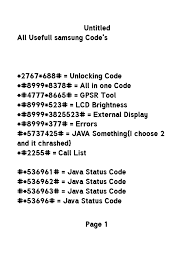
Maintenance-focused codes clear bloat and improve responsiveness.
Optimization entries:
- *#9900# – Delete dumpstate/logcat files to reclaim storage
- #273283255663282# – File copy and media scan menu
- #47778665# – GPRS tool (legacy but still functional)
These free RAM and storage without factory resets.
Troubleshooting Common Samsung Codes List Failures in 2025
Modern security features sometimes block Samsung codes list execution.
Resolution steps:
- Temporarily disable Auto Blocker and Knox Guard features
- Ensure stock dialer and latest system update
- Remove third-party call blockers
- Test on safe mode if persistent issues
Most codes restore functionality quickly.
High-Risk and Factory Reset Codes to Avoid Casually
Certain advanced entries in the Samsung codes list can wipe data irreversibly.
Dangerous codes include:
- 27673855# – Full factory reset (erases everything)
- ##7780## – Partial factory reset
- *#7284# – Modem settings (risk of bricking if misused)
Use only when intentionally restoring to stock.
Always backup via Smart Switch first.
Model-Specific Compatibility in 2025 Galaxy Lineup
The Samsung codes list maintains excellent support across current devices.
Confirmed working on:
- Galaxy S25, S25+, S25 Ultra
- Z Fold7 and Z Flip7
- A56, A36, and budget series
- Tab S10 tablets
Minor menu variations exist but core functionality persists.
FAQs About Samsung Codes List
What is the most powerful code in the Samsung codes list?
#0# launches the full hardware diagnostic suite for testing every sensor, display, and component thoroughly.
How can I quickly check IMEI using Samsung codes list?
Dial *#06#—it displays both IMEI numbers and serial instantly without any confirmation needed.
Why do some Samsung codes list items not work on my device?
Security features like Auto Blocker or carrier restrictions often block them; disable temporarily to restore access.
*Does #0011# still function in the 2025 Samsung codes list?
Yes, it provides detailed real-time network signal and band information on compatible models.
Are there risks using the Samsung codes list?
Diagnostic codes are safe; avoid reset commands without backups to prevent permanent data loss.
Which code reveals battery health details from Samsung codes list?
*#0228# shows voltage, temperature, cycles, capacity, and overall battery condition comprehensively.
Do new Galaxy models change the Samsung codes list?
Core codes remain consistent; only minor interface updates appear in One UI 7.
Conclusion on Samsung Codes List
The Samsung codes list stands as one of the most valuable hidden resources for Galaxy owners in 2025, granting direct access to professional-grade diagnostics, hardware verification, network optimization, and system insights that rival dedicated service tools.
From the indispensable #0# test suite and instant IMEI checks to advanced battery monitoring and firmware verification, these dialer-based shortcuts empower users to maintain peak performance, troubleshoot effectively, and understand their devices at a deeper level—all without external software or technical expertise.
As Samsung continues enhancing security and features with One UI 7 and Android 15, the enduring reliability of the Samsung codes list demonstrates thoughtful engineering that respects power users while protecting casual ones. Responsible exploration of these codes unlocks the full potential of Galaxy hardware.
- Key takeaways:
- Master #0# for complete hardware diagnostics.
- Use *#06# and *#1234# routinely for verification.
- Backup before any reset-related codes.
- Disable Auto Blocker for blocked entries.
- Leverage network codes for connectivity optimization.
